Device specification
MultiNode LAN 4TE uses PLC to transport data over low‑voltage mains cables. Its repeater function makes it well suited for large networks with up to 250 nodes.
Specification
MultiNode LAN 4TE includes:
- Five line connections (mains interface)
- One Gigabit Ethernet network interface
- Three indicator lights
- Power
- Network
- Ethernet
- One reboot button
- One factory reset button
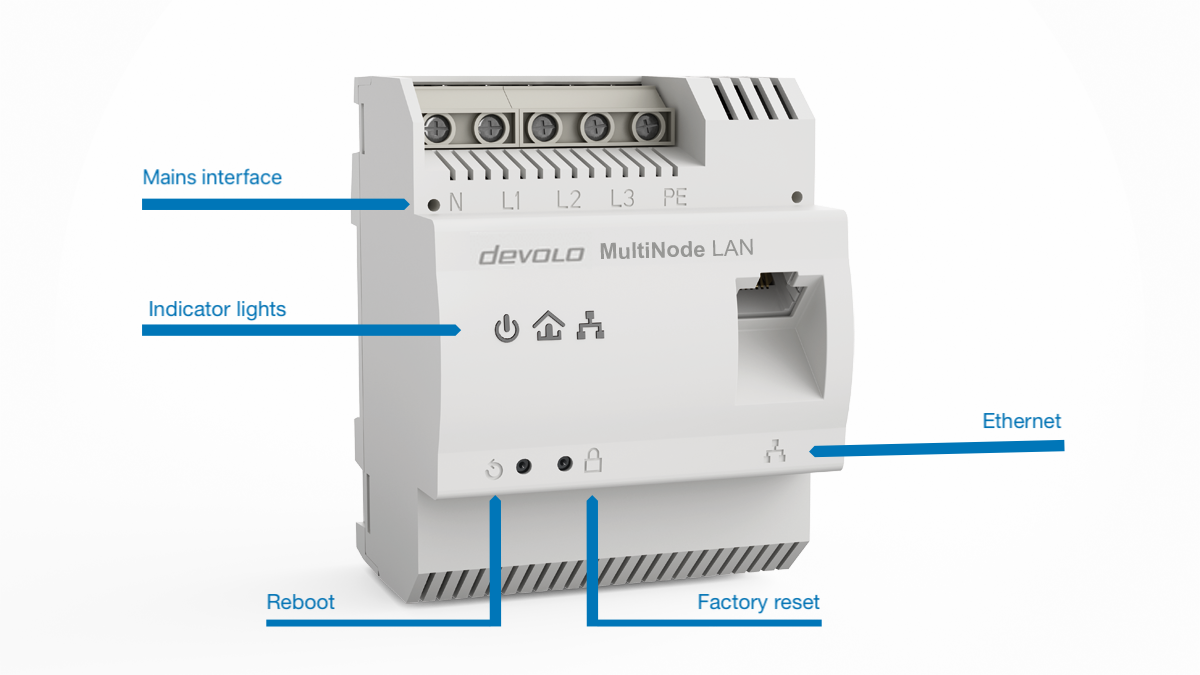 Front view of MultiNode LAN 4TE
Mains interface
The screw terminals for the primary voltage power line accept wires from 1.5 mm2 to 6 mm2.
Single‑phase operation using L1: For single‑phase operation, use the L1 terminal. L2 and L3 can remain open. The device is powered from L1/N, so using L1/N is mandatory.
Three‑phase connection: Connect neutral and three external conductors to terminals N, L1, L2, and L3. The device is powered via N and L1.
Operation with or without protective earth (PE): The device can operate without connecting PE to protective earth. However, the PE terminal can enhance signal transmission over powerline.
Ethernet interface
You can use the Ethernet interface to connect:
- the master node to the local network or to an Internet gateway, or
- regular nodes to their application devices, e.g., EV charging stations.
LEDs
The integrated LEDs show the status of the MultiNode LAN 4TE by illuminating and /or flashing in two different colours:
| LED | Behaviour | Status |
|---|---|---|
 Power Power |
Off | No power supply or node is defective. |
| On | Node is powered. | |
 Network Network |
Red for 5 s | Node booting after restart or power cycle. |
| Steady red | Node not connected to a MultiNode network; ready for configuration. | |
| Steady white | Node connected to a MultiNode network. | |
| White: 1.8 s on / 0.2 s off | Node connected but configuration incomplete. | |
| White/red alternating, 0.3 s each | Firmware update in progress. | |
| Red flashing, 0.5 s on/off | Factory reset completed successfully. | |
 Ethernet Ethernet |
Steady white | Ethernet uplink active. |
| Flashing white | Ethernet uplink active with data transfer. |
Factory reset button

Resetting MultiNode LAN 4TE to factory defaults
To restore the device to factory default settings, press and hold the factory reset button for more than 10 seconds.
Wait until the network LED flashes red, then add the MultiNode LAN 4TE to a network again.
Note that all settings will be lost.
If the node was part of a MultiNode network, it will be removed from that network.
Reboot button

Rebooting MultiNode LAN 4TE
To reboot the device, press the reboot button. The device will restart.
When the network LED lights up red for 5 seconds or longer, the device is operational again.