Powerline
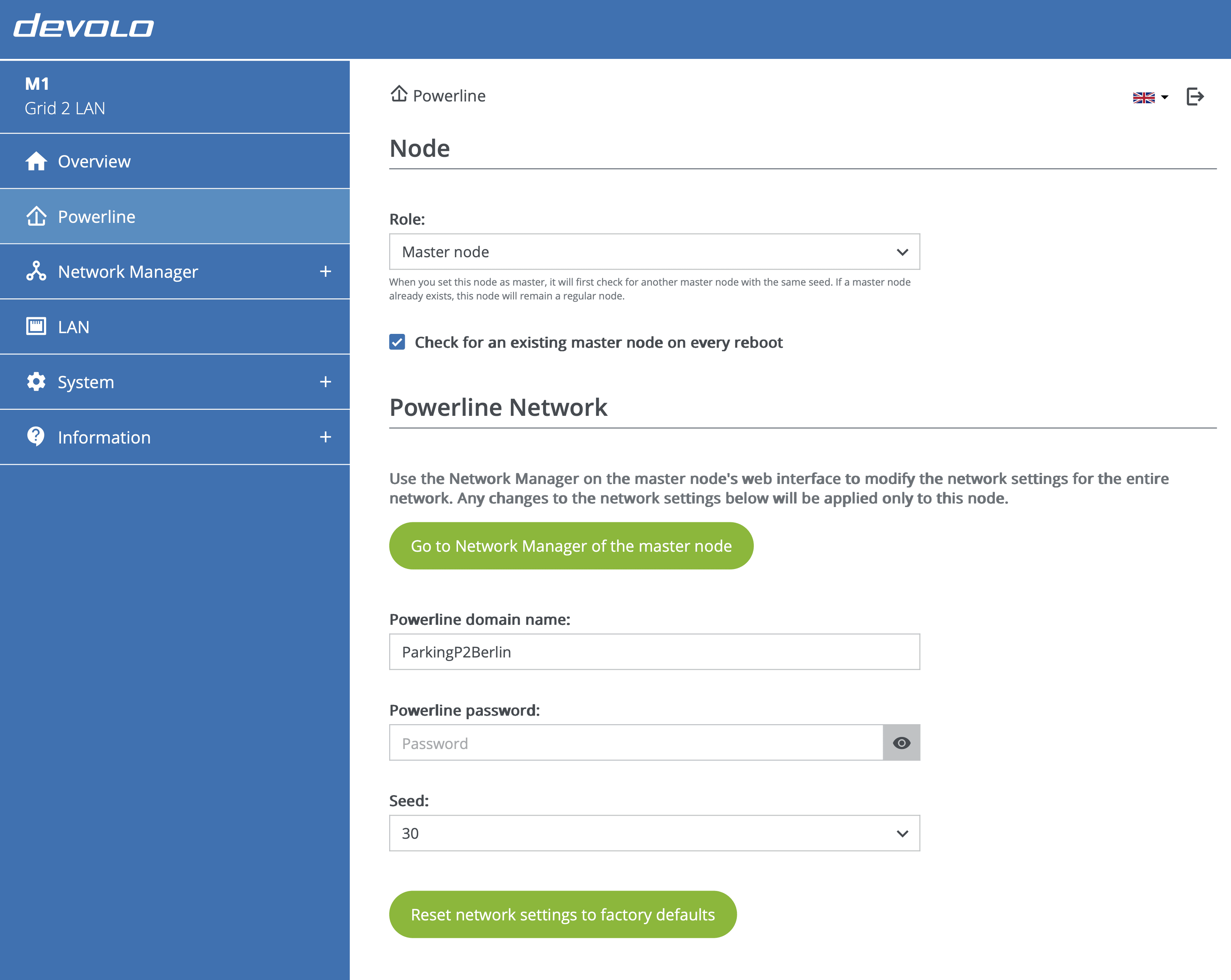
Use the Powerline page to view and edit these properties of the current node:
Node
Use the dropdown to set the node's role. All nodes are regular nodes by default, and each network has exactly one master node.
- When a regular node is set as the master node, the node first checks if another master with the same seed exists. If one is found, the node stays a regular node.
- When a master node is set as the regular node, the existing MultiNode network is dissolved. To form a network again, one of the regular nodes needs to be set as the master.
Powerline network
- To change Powerline parameters (domain name, password, and seed) for all nodes, click Go to Network Manager of the master node to open the Network Manager.
- To change Powerline parameters only for this local node, enter the target network’s settings (domain name, password, and seed). This is useful if you have an existing network and want to have current node join that network.
Network might take a while to be formed
Depending on network size, it may take time for nodes to connect together to form a network.
The network LED  shows the connection status.
Reset network settings to factory default
- To remove a MultiNode LAN 4TE from your network and restore to factory defaults, click Reset network settings to factory default. All configured settings will be lost.
- Wait until the network LED flashes red.
- To set up a new MultiNode LAN 4TE, see Setting up a new MultiNode network.